Skip to content

Your managed AI agency

Your AI agency. Less on your plate.

We set up and manage AI employees that do the routine work in your existing software: write and send emails, follow up with leads, update records and prepare reports. One clearly defined job, configured around your business.

$299/month + $650 one-time setupOne client business · One agreed workflow · Platform usage extra

  • Built for you
  • Scheduled cloud workflows
  • Managed after launch
Illustrative workflow
New website enquiryExample client · Home services

“Could you quote for a kitchen refit? Ideally starting in spring.”

  1. Enquiry sortedLead desk · Kitchen refit · asking about the process
  2. Missing detail foundLead desk · No project location given yet
  3. Reply draftedReply desk · Asks for the area · adds the approved booking link
  4. Waiting for your approvalYour team · Nothing is sent until someone approves it

Illustration: three simple AI desk characters beside an illustrative workflow, in which an example enquiry is sorted, a missing detail is found and a reply is drafted for you to approve. No real client data is shown.

THE AI SHIFT IS HERE. MAKE YOUR MOVE.

Don’t let yesterday’s workload cost you tomorrow’s customers.

While you’re clearing your inbox, an AI-enabled competitor can be answering enquiries and following up. A missed reply can become someone else’s sale.

Put an AI employee on the routine work. We set it up, test it and manage it—so you can focus on your customers and finish the day with less hanging over you.

Get my AI employee working Start with one workflow. $299/month + $650 setup. Platform usage extra.
  • Configured for your business
  • One agreed scope to start
  • Human approval built in
  • Managed after launch

MEET YOUR AI EMPLOYEES

Real tasks.
Less work on your plate.

Give your AI employee a job, the tools to do it and clear operating rules. From sending emails to updating records, it carries out the agreed routine and brings exceptions back to you.

AI Operations Coordinator

Tracks scheduled work and handoffs.
Reports completed tasks and exceptions.

EXAMPLE AI EMPLOYEE ROLES · SELECT A ROLE

THE JOB YOUR AI EMPLOYEE CAN DO

AI Lead Qualifier

Reads new inquiries, asks approved qualifying questions, records the answers in your CRM and routes promising leads to the right person. Follows up on missing details using your rules.

YOUR RULES. YOUR CONTROL.

You define a qualified lead, permitted follow-ups and when an uncertain inquiry needs a person.

Set up this AI employee

AI employees are configured automations with defined responsibilities. Each role is assessed for your tools and tested before launch. The $299/month starter covers one agreed workflow for one business, across up to two supported tools. Additional roles and workflows are scoped separately.

Less chasingA clear next step for routine work.
More visibilitySee activity and exceptions.
Room to focusKeep your attention on your clients.

Workflows to hand off

Give the busywork a new owner.

Your team is good at this work. It just isn’t the best use of them. Pick a workflow to see what a handoff could look like: what starts it, what gets prepared and the decision that stays with your people.

Six ways to hand off busywork

Illustrative workflow · scoped and tested before launch

Lead follow-up

An AI employee follows up and keeps your CRM current.

  • Website form
  • Gmail
  • HubSpot

Today · on someone’s list

A form lands at 4:52pm. Someone has to read it, work out what’s missing, write a reply and update HubSpot, usually after their own client work is done.

Handed off

TriggerA new website form or Gmail enquiry reaches the client’s inbox

  1. Identify the service requested and which qualifying details are missing
  2. Write and send routine follow-ups under your approved rules
  3. Update the permitted CRM fields and record the conversation
Prepared for reviewSample enquiry · Alder Interiors (fictional)
Need
Kitchen refit, possibly the utility room
Missing
Postcode · preferred start date
Draft reply
“Thanks, Sam. Which area is the property in? Then we can book the right designer for you.”
HubSpot
Proposed: new contact · stage Enquiry · owner to confirm

Human decision. This sample shows review mode. After testing, you can authorize routine sends and CRM updates within defined limits; exceptions still come to your team.

What comes backRoutine follow-up gets done, and your team sees what needs its attention.
Showing the Lead follow-up example.

  • Attention backYour team reviews prepared work instead of assembling it.
  • Fewer handoffsLess copying between inbox, CRM and project tool.
  • Better follow-throughNext steps drafted while the details are fresh.
  • Room for another clientCapacity that isn’t spent on chasing and tidying.
Map my first workflow

Bring one workflow. We’ll scope what to hand off, what stays with your team and which tools are involved. Examples are concepts for scoping, not a promise that every step can be automated.

Connections

The tools stay. The chasing goes.

No new dashboard for your team to learn. Prepared work shows up in the inbox, CRM and project tools your business already uses.

  • Gmail
  • Slack
  • HubSpot
  • Google Sheets
  • Notion
  • Asana
  • Google Calendar
  • Google Ads

Clientward scopes each connection around your existing stack. Before anything is deployed, we confirm which apps are supported for that workflow, what each one allows and exactly which permissions are needed, and the client authorizes them.

Explore 40 tools & request yours

Example flowIllustrative · not a live feed

  1. Incoming signalA client emails new holiday hours“We’re closed 24–26 December. Can you let people know?”
  2. AI prepares the workUpdates drafted, nothing changed yetA Notion client-wiki edit, a social post draft and an Asana task for scheduling.
  3. Human decisionThe account lead checks the datesTweaks the post wording and approves the rest.
  4. Approved updateWork lands where the team already looksNotion page updated, Asana task assigned, a short note posted in Slack.
App names describe commonly used tools. Clientward isn’t affiliated with or endorsed by their makers, and what a workflow can do depends on each app and the permissions granted.

LESS ADMIN. A MUCH SMALLER BILL.

Routine work.
Without another salary.

Before you hire for repetitive admin, see what an AI employee can take off your plate. We build and manage your first workflow. You keep your time for growing the business.

THE PAYROLL ROUTE

Adding an employee

Full-time hire · illustrative cost

$6,067/ month*

$72,800 a year in this example.

  • A recurring payroll commitment.
  • Recruiting, interviews and onboarding.
  • Training and day-to-day management.
  • Extra coverage needs extra planning.

A bigger commitment for a broader role.

95% LOWER MONTHLY FEE*

Clientward AI agency

Your AI employee · one managed workflow

$299/ month

+ $650 one-time setup · platform usage extra

  • We build, connect and test it for you.
  • Routine emails, follow-ups or admin handled.
  • Scheduled runs, including nights and weekends.
  • Ongoing maintenance. Exceptions brought to you.
Put my AI employee to work

THE DIFFERENCE ADDS UP

$5,768/ month*

Illustrative monthly cost difference

More room in your budget.
Less on your plate.

$68,562 first-year cost difference in this example, after our setup fee and before platform costs.

A full-time employee and one AI workflow have different responsibilities. This compares costs, not equivalent job coverage.

*Illustrative employee cost: $35/hour including employer costs × 40 hours/week × 52 ÷ 12, rounded. This is an assumption, not a salary benchmark. The 95% figure compares recurring monthly fees; it excludes setup and platform costs. Clientward covers one agreed workflow for one business across up to two supported tools. Human review and platform usage may add cost. Actual savings depend on the work automated and staffing costs you actually avoid.

AN AI EMPLOYEE. WORKING IN YOUR TOOLS.

Your AI writes the email.
And sends it, too.

Your AI email employee reads incoming messages, writes replies in your tone, sends authorized emails and follows up on schedule. It organizes the inbox, updates connected records and reports what it completed—so you spend less time doing the same admin every day.

24/7 schedulingClose the laptop. Agreed cloud routines can check for new work, send permitted follow-ups and update your tools overnight or on weekends.

We configure and test the job before launch. You choose sending permissions, limits and which messages need approval. Runs depend on connected services and usage limits; human support hours are agreed separately.

Set up my AI employee ↗
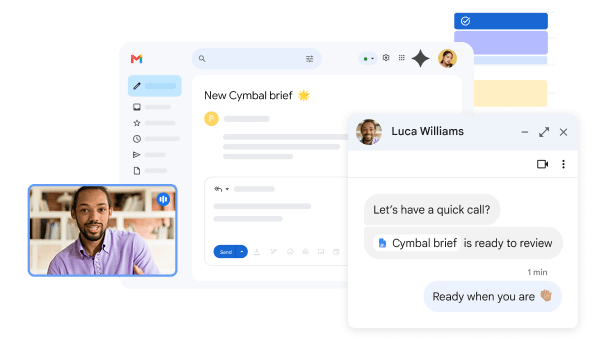
Google’s public Gmail image showing its email interface and productivity tools
Google’s public Gmail product image, shown as a software reference—not a Clientward run or endorsement. Source: Google Workspace ↗
Read → write → authorized send → follow up → report

The engagement

A calmer workload.
A clear monthly price.

We don’t hand you a platform and walk away. Every setup starts with one business workflow and a written proposal, so both teams know what’s being delivered, how it’s approved and who to talk to.

$299 / month

Plus $650 one-time setup. USD, per client business.
One agreed workflow across up to two supported tools. Configuration, testing, monitoring, maintenance, a monthly activity report and one minor adjustment.
Platform subscriptions and usage are extra; we estimate them before you sign. Additional workflows are quoted separately.

  • One first workflowStart focused with one client and one workflow, then expand from something proven together.
  • Setup and management, scoped separatelyYou see what it takes to build the workflow, and what it takes to run it.
  • Approval rules and support, agreedWritten down before launch and revisited as the work evolves.
Sign up
clientward.Draft for discussion

Engagement proposal

One workflow, scoped in writing.

Prepared for
Your business
Scope
One business workflow
Fees
$299/mo + $650 setup
  1. 01First workflowOne business workflow, defined end to end. For example, handling new enquiries.Defined in discovery
  2. 02SetupBuild, authorized connections and testing with sample cases.Scoped separately
  3. 03Ongoing managementMonitoring, maintenance, improvements and reporting.Scoped separately
  4. 04Approval rulesWhat the AI drafts, what it may send and who signs off.Agreed together
  5. 05SupportNamed contacts, an agreed channel and a clear escalation path.Agreed together
  6. 06Changes and exclusionsWhat sits outside the scope, and how new requests are handled.In writing
Illustrative outline. Actual scope, fees and terms are agreed in writing for each engagement.

How it works

From first message to managed workflow.

Five deliberate steps. Each one is reviewed with your team before the next begins, and nothing touches a client system until it’s been agreed and authorized.

  1. Apply

    Tell us about your business and the first task you want handled. Signing up commits you to nothing.

    Get started
  2. Discover

    A working conversation about the workflow, the systems involved, expected volume and what a good outcome looks like.

  3. Agree

    A written proposal covering deliverables, setup, management, approvals, support and exclusions. Nothing is built before it’s agreed.

  4. Build & review

    We build and test with sample cases. Your team reviews the work before any authorized connection goes live.

  5. Operate

    We run, monitor and improve the workflow, and report back to your team as agreed.

Questions

What business owners ask us first.

Something we haven’t covered? Put it in your application and we’ll answer it in discovery.

Ask when signing up

A managed service. You aren’t buying a software licence or a dashboard to configure yourself. We scope, build, test and run AI workflows for your business under an agreement with your business.

The AI handles repetitive work inside each workflow. Our team is responsible for setting it up as agreed, keeping it working and reporting back to you.

Sign up

Make room for your best work.

Start with the task that keeps pulling your attention away. Tell us what it is, and we’ll explore a managed workflow for your business. $299/month plus $650 setup, with platform usage extra.

Signing up starts a conversation. It isn’t a commitment, and it doesn’t connect to any system.